Reflections Journal

As I contemplated this assignment, I thought of real world situations I could have actually applied the Instructional Design methods and techniques because I am not a librarian right now or have had any extensive experience as a media specialist. I am limited as to what experience and wisdom in the field I can draw from. However, I did have interactions with the media school at the middle school I taught at and I saw this unique opportunity to apply the instructional design methods.
LIS6303.720U20
Intro to Instructional Design Activity
Part A:
Reflecting on Annette Lamb’s article: “Bursting with Potential: Mixing a Media Specialist’s Palette”, really educated me on the broad range of skills and expectations of a school media specialist. The position is not stagnant and is not just your library person confined behind the desk of the school media center.
The word that Lamb continues to use is “innovative” as in the “innovative media specialists”. With innovative methods comes with knowledge and skill particularly in collaborating with others, administrating programs and be keen to instructional media and technologies. Therefore, I will segue into my Part B of my assignment. I chose this problem/solution on improving the quality of the school’s morning show because when I was middle school reading teacher, I always thought about how to improve the morning show because it always seemed off-the-cuff and half-baked, and yes, they were middle schoolers, and that means coming with a lot of giggles and mishaps, but it doesn’t mean that it couldn’t be improved significantly.
Part B:
Improving the Quality of Our Middle School’s Morning News Show
Inconsistencies and lack of training for our school’s morning show on-camera volunteers plague our set. The volunteers express their interest through their homeroom teacher and then they come to me and I set them up the next day. The morning show is presented first thing in the morning and gets broadcasted (streamed) into the classrooms so that all the teachers, students, and staff get to see it before they start their school day. It has a weather forecast section, sports section, and inspirational and last-minute news and reminders.
Proper instruction and experience will improve the quality of the on-camera talents’ delivery. Therefore, the purpose of the planned instruction would prepare students the techniques and competency. Besides experience, I believe instructional intervention would be a good solution because right now there is no time for real instruction.
The problems are that too many students get filtered in every morning that they do not really master the art of stage/camera presence. The proposed solution would be that students who volunteer to do the morning show will be instructed to learn the various skills on how to run a successful live news show for their school morning program.
Essentially, the problem is due to the lack of knowledge and skill and the non-learning factor is not being able to identify the student’s skill level. Interventions can be graduating students who have learned enough studio time to be properly coached and be comfortable enough to be a newscaster. Currently, students do not have any instruction on how to conduct themselves on camera. No eye contact, proper vocal projection or camera presence. The learning gap may involve students not really applying themselves or take this role seriously. Selecting talent should be a try out like for theater or how you would for any sports tryout. Selecting the most interested and the most promising, I believe, would ensure a more professional-looking production and more appealing morning show for our school.

I did a short instructional presentation on How to Start a Podcast. One is a PowerPoint presentation with the click thru animations and the other one I converted into a video and uploaded to YouTube and it’s me narrating my instructional presentation.
This video is geared to an audience who are curious about starting a podcast and as I stated that this is not walking them through the daunting process of brain-storming, story boarding, recording, editing, hosting and marketing podcast, but I give them an overview. The problem being solved is that this short tutorial will at least give the audience a guidance on how to start. I would assess them by having them arrange a puzzle where they can place the steps in each module just like I did in the presentation. This activity shows that they can see in general what making a podcast entails.
Reflection: I read through some of the resources given and I was amazed in the effectiveness on how the presentation works without narration as a viewer and learning and how engaging it can be.
I also converted my PowerPoint into an MP4 and then uploaded that MP4 into a video editing software named VideoPad (a water-down version of the Adobe product and more intuitive). I overlayed an animation with some jazzy music to have a more pleasing lead into the presentation. I thoroughly enjoyed doing this project.
I chose to feature my podcast because podcasting is something I taught myself to do and I by all means do not consider myself an expert. Although I am constantly manipulating digital files in my professional and creative life, doesn’t mean I am proficient at any of the software. I am still learning Canva.com and I loving all the functionality it has with its drag and drop capabilities without having to manipulate it too much — the learning curve is reduced significantly. I am of the mind-frame of no muss, no fuss. Although, learning and working will always be a part of life, I always believe in simplicity and simplification but with elements of style.
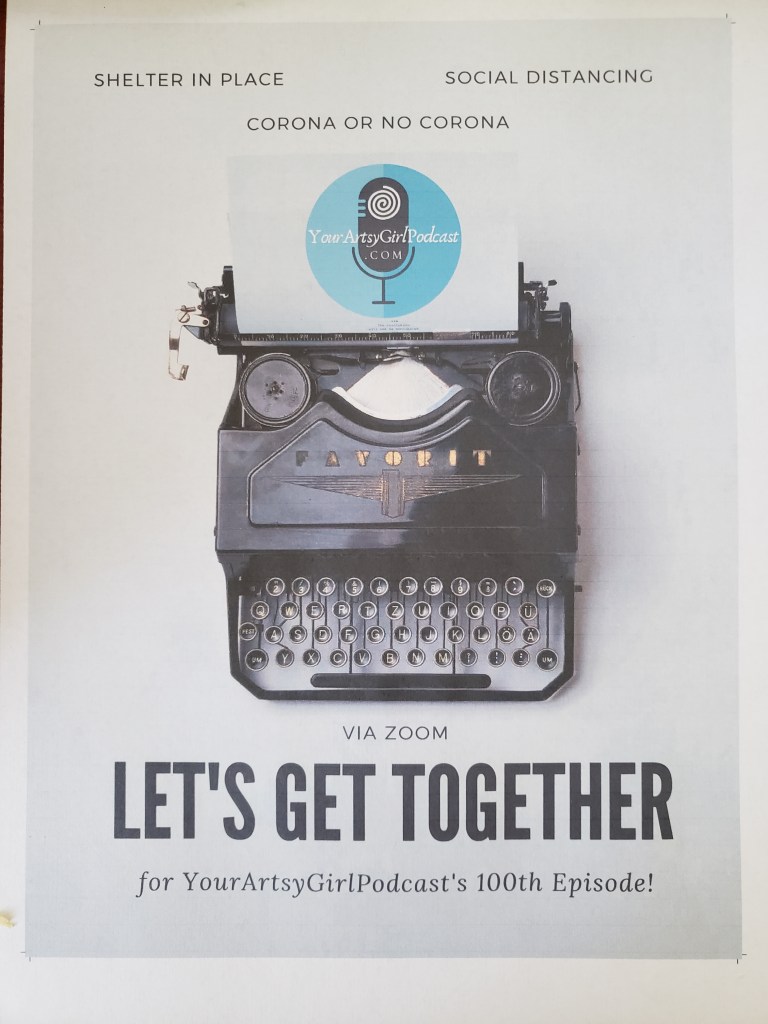
For my digital poster, I chose to do something that I have been mulling around in my head for some time. I have been thinking in having a 100th episode celebration with all my featured guests in one big party. Of course, assuming that we are still in pandemic mode, I decided to do a poster that addresses that possibility.

I fretted converting my digital poster into print because I did not know if Canva can do that. I was prepared to go find other measures but I did find the conversion capability and it allowed me to download my digital poster into a printable PDF with the margins and bleeds.
I decided that I will use Canva in my professional life because everything it is at your fingertips and resizing images and converting files is a breeze. I was pleased that my image came out really well (although I do not have a high-speed, expensive printer), it came out pretty good. I’m glad I got a chance to do this assignment because I got a chance to discover a great tool.
This is the first video poem where I incorporated music. I am still learning to improve my productions and I am still learning more each time.
I always feel constrained using video clips because it doesn’t feel organic to me, but I like the way it can communicate the tone of a piece. For my video, I used VideoPad (still a learning curve), but I find that producing video and audio frustrating; however, I also I realize I find my groove and I’m in the zone once I get started, an activity I find myself enjoy doing for hours. There is something about getting the timing right with the audio and visual and narration and that is a lot of starts and stops.

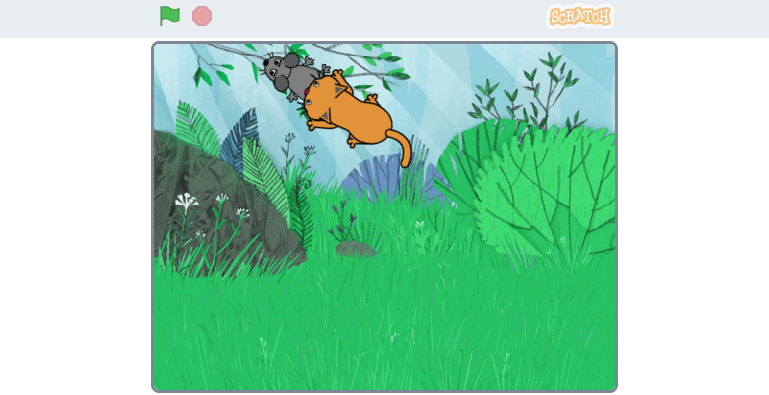
This is my very first Scratch creation. It is very basic, I know. The graphical user interface makes coding more visual and therefore intuitive as opposed to writing all the code out by hand.
I remember the and/if statements when I was a computer tech in the Army learning the old legacy language, Cobalt. I can see how people create things and challenge themselves in creating more complex games. It also has a wonderful supportive community. What interested me the most is the Scratch Poems category, of course.
Without further adieu, to play this very simple game, press the green flag and guide the mouse with your cursor to run away from the cat that is chasing it. Press the red button to stop. Enjoy!
 By the Stacks